Monday, 3 June 2019

Increasing data accessibility through lock avoidance via across-member Currently Committed semantics in Db2 pureScale

- David Sciaraffa, Software Engineering Manager – IBM Db2


In typical application environments, many concurrently running applications will attempt to read, insert, or update database data simultaneously.  Access to database data must be isolated from potential concurrency conflicts, so that operations are predictable with and without the presence of other concurrently executing applications.  “Isolation” is a capstone of A.C.I.D. compliant database systems.

The degree to which an application can see the data changes of other concurrently running applications is determined by its isolation levelSome isolation levels (like ‘repeatable read’ - RR) are very restrictive, others (like ‘uncommitted read’ – UR) are very liberal, while the most common (‘cursor stability’ – CS) strikes a good balance for most applications.

Db2 achieves isolation through multiple methodologies whose complexity is mostly outside the scope of this blog. The most basic methodology comes in the form of database locks. The read, insert, or update of a data row by an application may result in the database manager acquiring and/or holding a lock on the row, depending on the configured isolation level.

Focusing on the most common type of isolation (‘cursor stability’ – CS), when reading a row of data an application using this isolation level desires to read the most recently committed version of the row (ignoring any in-flight changes on the row by other uncommitted transactions). An application reading data with CS isolation may obtain a row lock on the row before processing it to ensure that only committed data is passed back to the user. The row lock is released after reading the row data.

In early versions of Db2, prior to the implementation of currently committed semantics, a row reader using CS isolation must wait for an in-flight application updating a row to commit, before acquiring the lock on the row in order to process it. This could be a significant bottleneck in high concurrency workloads.

With the implementation of currently committed semantics, a row reader using CS isolation is able to read the currently committed version of a row, bypassing any in-flight updates on that row.


Consider the following diagram depicting a row read application in lock-wait due to a concurrent row updater, with no currently committed semantics enabled:


[1] A user (App1) requests to update a row on table Tab1.
[2] App1 is granted a row lock on this row in exclusive (X) mode.
[3] App1 updates the row in the table, and a log-record is written into the recovery log stream (this log-record contains the original version of the row).  App1 has not yet committed its unit-of-work, so this row change is still in-flight.
[4] Another user (App2) requests to read this same row (CS isolation is inferred, but not depicted).
[5] App2 must acquire a row lock on this row to ensure to read the currently committed version of the row. It cannot acquire the row lock because an uncommitted in-flight transaction. App2 must wait until App1 committed and release the row lock, before proceeding.


With currently committed semantics enabled, a row reader application can now access the currently committed version of the row, bypassing the lock held by the row updater.  This is achieved by retrieving the currently committed row directly from the recovery log-stream. Information about where to find the currently committed version of the row within the recovery log stream is maintained with the lock-request-control-block (LRB) for the row, as depicted:


[1] A user (App1) requests to update a row on table Tab1.
[2] App1 is granted a row lock on this row in exclusive (X) mode.
[3] App1 updates the row in the table, and a log-record is written into the recovery log stream (this log-record contains the original version of the row). A pointer to the original version of the row in the recovery log stream is stored within the row lock information structure (LRB). App1 has not yet committed its unit-of-work, so this row change is still in-flight.
[4] Another user (App2) requests to read this same row (CS isolation is inferred, but not depicted).
[5] App2 must acquire a row lock on this row to essure to read the currently committed version of the row. It cannot acquire the row lock because the uncommitted in-flight transaction (App1).
[6] App2 uses the pointer to the original (currently committed) version of the row within the row lock information to retrieve the row from the recovery log stream.

In Db2 pureScale environments Version 11.1 and prior, support concurrently committed semantics was limited, a CS isolation row reader could bypass an in-flight row updater and retrieve the currently committed version of a record from the recovery log stream only when the row reader and row updater (lock holder) resided on the same member.  When the row updater was not on the same member as the row reader, the row reader would default to a lock wait condition, as depicted here:

[1] A user (App1) on pureScale member1 requests to update a row on table Tab1.
[2] App1 is granted a row lock on this row in exclusive (X) mode. This lock is effective in both the member local lock manager, as well as the global lock manager.
[3] App1 updates the row in the table, and a log-record is written into the member-local recovery log stream (this log-record contains the original version of the row).  A pointer to the original version of the row in the recovery log stream is stored within the row lock information structure (LRB). App1 has not yet committed its unit-of-work, so this row change is still in-flight.
[4] Another user (App2) on pureScale member2 requests to read this same row (CS isolation is inferred, but not depicted).
[5] App2 must acquire a row lock on this row to ensure to read the currently committed version of the row. It cannot acquire the row lock because an uncommitted in-flight transaction. 
[6] App2 cannot utilize the pointer to the original (currently committed) version of the row within the row lock information to retrieve the row, because this information only exists on member1. App2 must wait until App1 commits and releases the row lock, before proceeding.

Starting in Version 11.5, a CS isolation row reader in a Db2 pureScale environment is capable of retrieving the currently committed version of a record was when either the row reader and row updater (lock holder) resided on the same member, or on different members, as depicted here:

[1] A user (App1) on pureScale member1 requests to update a row on table Tab1.
[2] App1 is granted a row lock on this row in exclusive (X) mode. This lock is effective in both the member local lock manager, as well as the global lock manager.
[3] App1 updates the row in the table, and a log-record is written into the member-local recovery log stream (this log-record contains the original version of the row).  A pointer to the original version of the row in the recovery log stream is stored within the row lock information structure (LRB). App1 has not yet committed its unit-of-work, so this row change is still inflight.
[4] Another user (App2) on pureScale member2 requests to read this same row (CS isolation is inferred, but not depicted).
[5] App2 must acquire a row lock on this row, in order to ensure to read the currently committed version of the row. It cannot acquire the row lock because an uncommitted in-flight transaction. 
[6] App2 cannot utilize the pointer to the original (currently) version of the row within the row lock information to retrieve the row, because this information only exists on member1.
[7] App2 communicates with Member1 (via an RPC request) to retrieve the original (currently committed) version of the row using the row lock information on member1. The row is returned back to member2.

The enhancement is enabled by default starting in Version 11.5.


I hope this information is useful. If you have any thoughts or questions, feel free to submit a comment below.

Sunday, 24 March 2019

Db2 LOAD command – Estimating TCP/IP Ephemeral Ports in a Database Partitioned Environment

- David Sciaraffa, Software Engineering Manager – IBM Db2


The Db2 LOAD command is a commonly used operation for bulk inserting very large quantities of data into new or existing tables. The operation is multi-process and highly parallelized, and benefits from minimal logging.  The LOAD operation was designed to assume significant CPU and memory resources to achieve maximum throughput.  Tuning of LOAD resources is traditionally done by configuring it’s CPU_PARALLELISM, DATA_BUFFER, DISK_PARALLELISM, and ANYORDER modifiers (see Options for improving load performance).

Load Process Model in DPF Environments
In Partitioned Database (DPF) environments, LOAD operations further benefit from parallelized partitioning of data to separate database partitions. This is well described in Loading data in a partitioned database environment.

Consider the following diagram, which illustrates some of the key processes of a Load operation in a DPF environment. In this example, imagine we have a 20 database partition configuration, with db-partition #0 used solely as Catalog partition, and tables defined in a database partition group which spans database partitions #1 through #20. 


Load Coordinator Agent:  The Coordinator Agent spawns all other agents required to perform the Load on all database partitions, and monitors their status. The Coordinator Agent will reside on the database partition where the application is connected.  This is also where the source data files reside (except when the  CLIENT option is used to specify a remote client-side file).  If the input source if of type CURSOR instead of a data file, then the Coordinator Agent opens the cursor and fetches the records from it, passing those records to the Partitioning Agent(s) for processing).

Pre-Partitioning Agent(s):
The Load Pre-Partitioning Agent opens the input source data file (or pipe, or user supplied file transfer command) and sends buffers containing complete records to each Partitioning Agent via a tcpip socket/port in a round-robin fashion. This Agent always runs on the coordinator database partition where the source data file resides.  There is one Pre-Partitioning Agent per source data file specified on the Load command, when the ANYORDER modifier is specified (default).  A Pre-Partitioning Agent is not created when the input source is of type CURSOR.

Partitioning Agent(s):
The Partitioning Agent receives data from each Pre-Partitioning Agent, extracts the partitioning columns from each data record, determines the target database partition where these records should reside, and sends the record to each Media Reader running on the database partition via  tcpip sockets/ports. By default, there is one Partitioning Agent per each database partition where the database partition group for the target table is defined. The number also configurable using the PARTITIONING_DBPARTNUMS load option, and the PARTITIONING_DBPARTNUMS option. The maximum number of Partitioning Agents is currently 25 (which may change in a future release).

Load Agent(s):
The Load Agent spawns and monitors all of the Load sub-agents which constitute the Load operation on a single database partition. These sub-agents are described briefly in Introduction of db2 load edus in single partition database. (The Load Agent corresponds to the ‘db2agent’ in that document).  A description of these Load sub-agents is beyond the scope and intention of this blog.  By default, there is one Load Agent per each database partition where the database partition group for the target table is defined.  The number is also configuration using the OUTPUT_DBPARTNUMS option.

Media Reader EDU(s):

The Media Reader EDU receives data from each Partitioning Sub Agent, and feeds this data into the Load sub-agents on the database partition for insertion into the table on the database partition. There is one Media Reader EDU per Load Agent.


Number of TCP/IP Ports used
Consider the following diagram, which illustrates the TCIP/IP sockets/ports used to transmit data between Load Pre-Partitioning Agents, Partitioning Agents, and Media Reader EDUs in a DPF environment.


The number of TCP/IP sockets/ports required are:

Let A equal the number of Pre-Partitioning Agents.
(Each Pre-Partitioning Agent will require a TCP/IP connection with each Partitioning Agent).

Let B equal the number of Partitioning Agents.
(Each Partitioning Agent will require a TCP/IP connection with each Pre-Partitioning Agent, and also require a TCP/IP connection with each Media Reader EDU).

Let C equal the number Media Reader EDUs
(Each Media Reader EDU will require a TCP/IP connection with each Partitioning Agent).


The total number of TCP/IP sockets/ports required by LOAD across all database partitions is:
Total = (B + C) + 2 x ((A x B) + (B x C))


In this example:
- We have a 20 database partition configuration, with db-partition #0 used solely as Catalog partition, and tables defined in a database partition group which spans database partitions #1 through #20. 
- The Load operation is invoked on database partition #0 – thus the Coordinator Agent for this Load operation resides on this database partition.
- Two raw input data files were specified in the Load, thus we have two Pre-Partitioning Agents residing on this database partition.
- Each of the two Pre-Partitioning Agents are sending data records to 19 Partitioning Agents (on db-partitions #1 through #20).
- Each of the 19 Partitioning Agents are partitioning and sending data to the 19 Media Reader EDUs (on db-partitions #1 through #20).
- Each of the 19 Media Reader EDUs is processing data and inserting it into the database on its database-partition.


From the Example above, we have:
A (Pre-Partitioning Agents) = 2
B (Partitioning Agents) = 19
C (Media Readers) = 19
Thus, the total number of tcp/ip ports across all database partitions is (B + C)  + 2 x ((A x B) + (B x C))  =  (19 + 19) + 2 x ((2 x 19) + (19 x 19))  =  437.


(Note, you can use the information above to infer the number of TCP/IP ports required on a specific database-partition).


Configuring port ranges

The PORT_RANGE option of
Load allows for the specification of the range of ports that Load should use on each database partition, as described in Configuration options for partitioned database environments.

At the operating system level, the range and quantity of ephemeral tcp/ip ports can be configure on AIX using the TCP_EPHEMERAL_LOW setting. on Linux using the ip_local_port_range configuration.
How To check and change the TCP Anon Port range in solaris,linux,hp-ux,aix.


I hope this information is useful. If you have any thoughts or questions, feel free to submit a comment below.


Sunday, 10 March 2019

Db2 and Db2-on-Cloud - Technical Advocate Newsletter – March 2019

image_thumb23_thumb


    Beta -
    DB2 Early Access Program: Beta now Available for the Next Release of Db2
    Get a sneak peek at next generation database technology with the DB2 Early Access Program. Sign up now to shape the future of DB2, test your current infrastructure, and be part of our vibrant community.
    The first beta drop of the upcoming release of Db2 is now available.
    http://bit.ly/2UlwbuU


    Conference & Summits -
    International Db2 Users Group Conferences (North America and Europe)
    Early Bird Registration Is Open!
    Over the years, IDUG has become known for hosting dynamic conferences packed with the cutting-edge content you need. This year will be no exception. Be sure to make your plans to attend. With great sessions, keynote speakers, workshops, and more, you won't want to miss this event.
    North America: June 2-6, Charlotte, NC, USA: https://www.idug.org/page/na2019
    Europe: Oct 20-24, Rotterdam, Netherlandshttps://www.idug.org/p/cm/ld/fid=1634


    Tutorial - Running HA IBM DB2 on Kubernetes
    IBM Db2 is a widely used enterprise database and is part of a larger Db2 family with big data, analytics, and data-streaming use cases. IBM has released and supports a number of DB2 container images on the Docker Store, making it easier than ever to deploy Db2 on your container platform. The aim of this blog post is to demonstrate a Db2 deployment architecture on Kubernetes using Portworx persistent volumes. Following this post, you’ll understand how to run Db2 in production on Kubernetes.
    https://www.ibm.com/blogs/bluemix/2019/01/how-to-running-ha-ibm-db2-on-kubernetes/


    Conferences & Summits - Think 2019 - Watch replays on demand
    Watch Think 2019 replays and videos on demand. Revisit your favorite sessions. Catch all the moments you missed. Share insights with your network. These playlists and videos offer you the chance to relive the highlights of Think 2019.
    https://www.ibm.com/events/think/watch/


    Conference & Summits -
    Central Canada Db2 User Group, April 29-30, 2019
    In its 34th year, the Central Canada Db2 User Group continues to offer quality technical Db2 education. Our 2-day conference brings together many of the best speakers from IDUG NA and the Db2 Labs. For a fraction of the price of larger events, we bring you two days packed with educational opportunities within the professional surroundings of the Bank of Montreal Institute for Learning. If you and your colleagues are in the Toronto area, or can make the trip to join us, you should not miss this opportunity.
    For more details and to register: http://www.ccdb2.ca/home.htm


    Webinar - The Perfect Db2 Server (plus bonus: What's New Db2 V11.1.4.4)
    Klaas Brant, IBM Db2 GOLD Consultant, presents how to achieve an optimally configured Db2 server including memory, storage, instances, STMM, monitoring, and more! Bonus: Kelly Rodger from the IBM Canada Lab will also share with us What's New in Db2 V11.1.4.4!
    Watch the replay: https://www.dbisoftware.com/blog/db2nightshow.php?id=760


    Flash -
    Load Operation May Trap or Cause Data or Index Page Corruption In V11.1.4.4, when Reading Pages From 9.7 Or Prior Release.
    For databases that were created in Version 9.7 or earlier releases, which have been upgraded through newer releases and eventually to Version 11.1.4.4, a LOAD operation performed in Version 11.1.4.4 may trap/crash or cause silent data or index page corruptions, if any existing data or index pages had not previously been updated by non-LOAD operations while running on the newer releases, and then accessed and updated by Load in Version 11.1.4.4.
    http://www.ibm.com/support/docview.wss?uid=ibm10871854


    Webinar - Db2 LUW Native Encryption
    Paul Bird, IBM Senior Technical Staff Member, offers a great presentation to help you learn about Db2 Native Encryption and how to protect your databases from evil-doers! Paul's talk covers preparation, implementation, and operational considerations.
    Register now for March 29,11:00AM ET live broadcast, or replay after this date.
    https://attendee.gotowebinar.com/register/1954676983580277506?source=db2nshome


    Webinar - What's New is Db2 Warehouse 3.4.0
    Join us to hear about "What's New" in the latest release of Db2 Warehouse. Topics to be covered include: Review features of v3.4.0; Demo: IBM Data Replication for Continuous Availability using Db2 Warehouse as a source and as a target -presented by Cheung-Yuk Wu, a senior Db2 Warehouse developer. The webcast will conclude with a Q&A segment. Come with questions!:
    Register now for March 8,12:00PM ET live broadcast, or replay after this date.
    https://ibm.co/2Ur5mVY


    Survey - Lab Advocate Engagement Survey
    If you haven't already, please help us improve the lab advocate program by completing the lab advocate engagement survey.
    http://bit.ly/2019_Db2_lab_advocate_customer_survey

    Saturday, 8 December 2018

    Improving Read Availability of the HADR Standby database… Avoiding the Replay-only Window

    - David Sciaraffa, Software Engineering Manager – IBM Db2


    A Db2 database can be easily configured for high availability by maintaining a real-time synchronized peer database using a feature called High Availability Disaster Recovery, or more commonly known as ‘HADR’.  An HADR standby database stays synchronized with a primary database by replaying log-record data reflective of all changes made on the primary database. HADR is quite simple to configure, and is virtually seamless to applications.  HADR is an extremely popular Db2 feature, and is well documented within the Db2 Knowledge Center, as well as the HADR Developerworks Wiki.


    Reads on Standby feature

    In Db2 Version 9.7, IBM introduced an HADR feature called “Reads on Standby”, which allows for read-only SQL queries to read data from the HADR standby database, as depicted in the following diagram:

    image


    Of the several restrictions present in the Reads on Standby feature, one restriction in-particular made it difficult for many users to broadly adopt, specifically called the replay-only window


    Replay-only Window restriction (prior to Version 11.1.4.4)

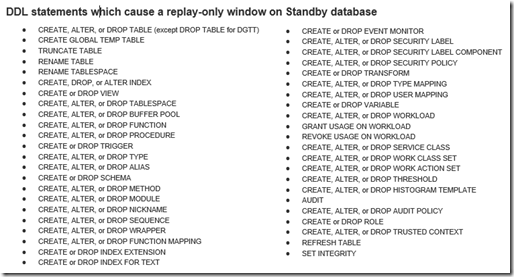
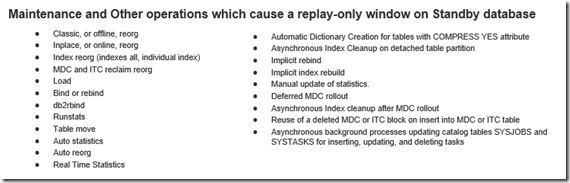
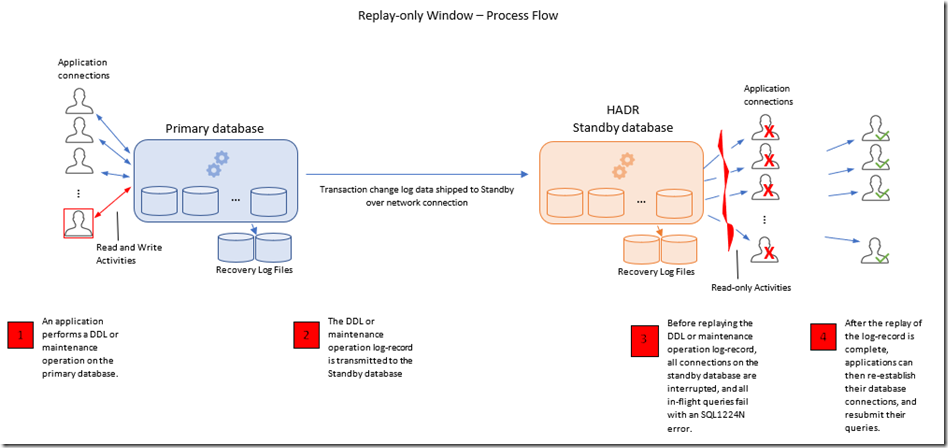
    When an HADR standby database is replaying log-record data, if it encounters a log-record for a maintenance or Data Definition Language (DDL) operation (such as most CREATE, ALTER, or DROP statements, REORG, RUNSTATS, and other such operations), the standby database triggers a condition called the "replay-only window", where all executing queries on the standby database are interrupted, all database connections are terminated and new connections to the standby are blocked (receiving an SQL1224N error code).   Only after the replay of the DDL or maintenance operation has completed, are new connections allowed on the standby database again. 

    The types of DDL statements and maintenance operations that cause a replay-only window are well documented, and also listed below for reference:

     image  image


    The following diagram depicts the process-flow and effect of the replay-only window:

    image


    When the replay-only window is triggered, diagnostic messages appear in the db2diag.log, like so:

    2017-11-22-15.48.36.321657-300 I522432E731           LEVEL: Info
    PID : 25476 TID : 140255646705408 KTID : 26687< PROC : db2sysc INSTANCE: db2inst1 NODE : 000 DB : TESTDB APPHDL : 0-8 APPID: *LOCAL.DB2.171122204107 HOSTNAME: myhost1 EDUID : 87 EDUNAME: db2redom (TESTDB) FUNCTION: DB2 UDB, recovery manager, SQLP_REPLAY_ONLY_WINDOW_STAT::sqlpStartHadrReplayOnlyWindow, probe:9140 MESSAGE : Replay only window is triggered by this log record: LogStreamId / TID< / LSO / action
    and:
    2017-11-22-15.49.28.915844-300 E546560E554           LEVEL: Warning
    PID     : 25476                TID : 140255646705408 KTID : 26687<
    PROC    : db2sysc
    INSTANCE: db2inst1             NODE : 000            DB   : TESTDB
    APPHDL  : 0-8                  APPID: *LOCAL.DB2.171122204107
    HOSTNAME: myhost1
    EDUID   : 87                   EDUNAME: db2redom (TESTDB)
    FUNCTION: DB2 UDB, base sys utilities, sqeLocalDatabase::HdrEndRep
    layOnlyWindow, probe:210
    DATA #1 : String, 73 bytes
    Replay only window is inactive, connections to Active Standby are allowed

    Additional information on how to monitor the replay-only window is described in sections ‘Diagnostic log messages during replay-only window’ and ‘Monitoring the replay-only window’ in Knowledge Center topic Replay-only window (and replay-only window avoidance) on the active standby database.

    The replay-only window can be a show-stopper to the usefulness of the Reads on Standby feature, when applications on the primary database perform DDL operations often, since the frequency of replay-only window on the standby database increases, and thus queries on the standby are interrupted often.  The create and drop of temporary tables appear to be a very common DDL operation inherent in many workloads.


    Replay-only Window avoidance (starting in v11.1.4.4)

    Starting in Db2 Version 11.1 Mod Pack 4 Fix Pack 4 (v11.1.4.4), a significant improvement to the replay-only window is now available, by enabling the DB2_HADR_ROS_AVOID_REPLAY_ONLY_WINDOW registry variable.

    When the registry variable is set to ON, the standby database does not enter the replay-only window. Instead, only existing application connections on the standby database which hold locks on tables, indexes or other objects that conflict with the DDL or maintenance operation to be replayed will be forced off. Other connections, including new connections, are permitted to continue, as depicted in the following diagram:


    image


    With this improvement, a create or drop of a temporary table on the primary database, which are the most common DDL operations in day-to-day workloads, do not cause any interruption to application connections on the standby database.  Furthermore, the impact from a DDL or maintenance operation performed on a regular table on the primary database is limited only to application connections on the standby database which hold or require a lock on that specific table at the time that the operation is being replayed on the standby.

    Note, application connections on the standby database may experience a brief lock-wait condition if the table or object they are trying to access currently has a DDL or maintenance log-record replayed on it. For information on how to determine if an application on the standby database is in a prolonged lock-wait behind a DDL log-record replay operation, see section ‘Monitoring lock conflicts when replay-only window avoidance is enabled’ in Knowledge Center topic Replay-only window (and replay-only window avoidance) on the active standby database.


    Additional note,  even when replay-only window avoidance is enabled, the following few DDL operations will still cause a full replay-only window on the standby database:

    image


    I hope this information is useful. If you have any thoughts or questions, feel free to submit a comment below. 

    Tuesday, 27 November 2018

    Db2 and Db2-on-Cloud - Technical Advocate Newsletter – November 2018

    image_thumb23_thumb


      Announcement - Db2 Version 11.1 Mod4 Fix Pack4 (v11.1.4.4) is Available for Download
      What's new in Modification Pack 4: https://ibm.co/2E0H3tu
      List of high impact & pervasive (HIPER) fixes (APARs): https://www-01.ibm.com/support/docview.wss?uid=swg21994955
      List of all fixes (APARs) included in this fixpack: https://www-01.ibm.com/support/docview.wss?uid=swg21995889
      Fixpack download page: https://www-01.ibm.com/support/docview.wss?uid=ibm10741687


      Conferences & Summits - Think 2019 (February 12-15, San Francisco, CA)
      Think 2019 is the one business and technology conference designed to deliver the technical training, strategic expertise, and impactful lessons every organization now needs to compete in today's changing world. As our flagship event, Think offers an exclusive look into the technologies, the strategies, and the services that set IBM apart as the leader for enterprise-grade AI, cloud, and cybersecurity.
      Our exciting lineup of speakers keeps growing, with NFL legend and San Francisco favorite Joe Montana joining us to share how his skills have helped him find success on and off the field.
      https://www.ibm.com/events/think/


      Roadmaps -
      Db2 Development Roadmaps are Now Accessible to Everyone
      Curious about the feature and function committed to upcoming versions of Db2? You can now explore live development roadmaps for Db2 and the IBM Analytics family of products. This content is live and subject to change.
      http://bit.ly/2DJ7p2o


      Seminar -
      Data Server Manager - Proof of Technology (Nov 28, Chicago IL)
      Please join us for a light continental breakfast and lunch as we learn about Data Server Manager (DSM) for DB2 LUW. Topics include Monitoring, Tuning, Configuration, and Administration.
      https://ibm.co/2DJnLrt


      Conference -
      International Db2 Users Group Conference - Call for Speakers (June 2-6, 2019)
      A call for speakers for the International Db2 Users Group (IDUG) Technical Conference on June 2 - 6 2019 in Charlotte, North Carolina is currently under way. This is a great opportunity for Database Architects, Administrators, Planners, and Application Developers to:
      · Spotlight interesting projects and experiences with Db2 or the Db2 family of products.
      · Gather insight and discussion on your Db2 project, leverage the experience of other experts.
      · Network with other Db2 professionals and consultants.
      · Build your brand and exposure as a database technical professional.
      https://www.idug.org/p/cm/ld/fid=1519


      Webinar - A Crash Course on Db2 pureScale, and It's Benefits
      IBM Champions, and Db2 Certification Book Authors, Mohan Saraswatipura and Kent Collins return as our special guests to give us a crash course on Db2 pureScale and its advantages. Gather a wealth of excellent information on Db2 pureScale including best practices, database manager configuration settings, database configuration settings, registry variables, HADR considerations, how to size memory, monitoring, workload manager (WLM), and much more! Get the PDF for reference AND watch our replay so that you don't miss Kent's helpful explanations! Continue...
      Watch the replay: http://bit.ly/2FOxQGC


      Webinar -
      SAP on Db2 (from Oracle) Success Story, and Db2 SAP on AWS
      Arwel Owen (Princess Ltd) completed a VERY successful migration from Oracle to Db2, and then another migration to Db2 V11.1.2.2 SAP on AWS Cloud. The compression, cost savings, and performance results are simply ASTOUNDING! Watch our fun and informative replay for details...
      Watch the replay: https://www.dbisoftware.com/blog/db2nightshow.php?id=752

      Webinar - What's New in Db2 Warehouse (Dec 7, 2018)
      Join us for our next "What's New: Db2 Warehouse" to hear about the latest features and functionality of our latest release.
      https://ibm.co/2PTuFBS


      Webinar -
      Troubleshooting Db2 LUW Production Issues
      Downtime is expensive. Most DBAs have been in the hot seat with management demanding rapid information and problem resolution. Michael shares his robust triage plan. Watch and learn from an experienced pro. Michael Krafick (IBM Champion Senior DBA) makes great use of entertaining and helpful graphics, he's funny, he speaks from the heart and with solid knowledge and experience, and he shares ideas and tips that will help you be successful.
      Watch the replay: https://www.dbisoftware.com/blog/db2nightshow.php?id=757


      Flash -
      Db2 Version 10.5 Fix Pack 10 for AIX 64bit has been republished with additional optimizations
      Db2 Version 10.5 Fix Pack 10 for AIX 64bit was published on July 10, 2018 without optimization on a few libraries, which may result in database performance degradation in some workload scenarios. This package was republished on October 22, 2018 with optimizations that match previous Fix Packs, and users should deploy this new version.
      https://www-01.ibm.com/support/docview.wss?uid=ibm10735519


      Flash - A tablespace may be unrecoverable via restore+rollforward if an extent reclamation occurred on an MDC or ITC table while the Online Backup was running
      If an Online Backup operation is in progress, and extent reclamation occurs on a MDC or ITC table, then a future RESTORE and ROLLFORWARD TO END OF BACKUP operation from this backup image may fail and leave this table space unavailable to recover.
      https://www-01.ibm.com/support/docview.wss?uid=ibm10741877


      Db2 Community - Follow the Db2 Developer and Administrator Community
      Share. Solve. Do More.
      https://developer.ibm.com/data/db2/


      Announcement -
      End of Support (EOS) for Db2 Version 10.5 is April 30, 2020.
      Effective April 30, 2020, IBM will withdraw support for Db2 Version 10.5. Extended support will be available beyond this date.
      https://ibm.co/2NCGTNi


      Follow-us! - Stay up to date on the latest news from the Db2 team
      IBM Support Community: (http://ow.ly/rPsM30fHnwI)
      Db2 Support Twitter channel: @AskIBMAnalytics (https://twitter.com/AskIBMAnalytics)
      AskIBMAnalytics Facebook channel: @AskIBMAnalytics (https://www.facebook.com/AskIBMAnalytics/)
      developerWorks Answers (forum): https://developer.ibm.com/answers/topics/
      Thoughts from Db2 Support (blog): https://www.ibm.com/developerworks/community/blogs/IMSupport?lang=en
      Db2 Technical Advocacy Wiki: https://www.ibm.com/developerworks/community/groups/community/Db2_Technical_Advocacy_Program

    Friday, 14 September 2018

    Db2 and Db2-on-Cloud - Technical Advocate Newsletter - Sept 2018

    image


    Announcement - Db2 Version 10.5 Fix Pack 10 (v10.5.0.10) is Available for Download
    List of high impact & pervasive (HIPER) fixes (APARs): https://www-01.ibm.com/support/docview.wss?uid=swg21994955
    List of all fixes (APARs) included in this fixpack: http://www-01.ibm.com/support/docview.wss?uid=swg21633303
    Fixpack download page: https://www-01.ibm.com/support/docview.wss?uid=swg24045012

    Announcement -
    Db2 Version 11.1 Mod3 Fix Pack3 iFix002 (v11.1.3.3.ifix2) is Available for Download
    List of high impact & pervasive (HIPER) fixes (APARs): https://www-01.ibm.com/support/docview.wss?uid=swg21647054
    List of all fixes (APARs) included in this fixpack: http://www-01.ibm.com/support/docview.wss?uid=swg21995889
    Fixpack download page: https://www-01.ibm.com/support/docview.wss?uid=ibm10720009

    Announcement -
    End of Support (EOS) for Db2 Version 10.5 is April 30, 2020.
    Effective April 30, 2020, IBM will withdraw support for Db2 Version 10.5. Extended support will be available beyond this date.
    https://ibm.co/2NCGTNi

    Virtual Conference -
    2018 Db2 Lab Day - Monday October 1, 2018
    Please join us for a great set of sessions on our 2018 Db2 Lab Day. Db2 is at the core of IBM’s Hybrid Data Management strategy. This will be a full day of sessions to update you on all the latest news related to Db2 and the Db2-based Common SQL Engine offerings and strategy..
    https://www.idug.org/p/cm/ld/fid=1625

    Conferences & Summits -
    Upcoming International Db2 Users Group (IDUG) Technical Conferences & Summits
    The events offer new educational opportunities and more training than ever before! Attendees will experience: Five days of education sessions; Half and full-day workshops; More than 100 one-hour technical sessions; Three expert panels on Db2 for z/OS, Db2 & Application Development; Opportunities to get certified; And much more!
    IDUG & IBM Data Tech Summit, 8 – 10 October 2018 | San Jose, California, USA: https://www.idug.org/p/cm/ld/fid=1591
    IDUG EMEA Db2 Tech Conference, 4 – 8 November, 2018 | Malta: https://www.idug.org/EMEA2018

    Webinar -
    What's New in Db2 on Cloud
    From the time that we announced the free tier (Lite Plan) at THINK 2018, the past few months have shown significant enhancements to Db2 on Cloud. In that time, we have brought federation capabilities to make it easier to connect to another Db2 database, offsite disaster recovery to ensure the highest levels of availability and ease-of-use updates to our web console and IAM/backups integration. Join us for a two-part series where we will do a deep dive into all of this and a few other core features to help you get the most out of using Db2 on Cloud. Part one on September 13th will cover HADR and Federation. Part two on October 18th will cover IAM and backups and various web console enhancements.
    Part 1: http://bit.ly/2Ogfdet
    Part 2: http://bit.ly/2p1kb3H

    Webinar -
    Adaptive Workload Management in Db2 Warehouse
    IBM Db2 Warehouse (and Db2 Warehouse on Cloud) has recently rolled out a new Adaptive Workload Management technology that allows you to easily manage your database resources across workloads and ensure they meet their desired performance objectives. This exciting new technology automatically manages the scheduling and execution of work in your system based on resource targets you assign, ensuring stable and reliable performance even in the face of the most highly concurrent workloads. This session will introduce you to these new capabilities and show you how you can leverage them in your own environment.
    Register to access the video replay: ibm.biz/Db2TT_Jul2018

    Announcement -
    Data Virtualization (Federation) for Db2 on Cloud
    IBM is happy to announce Db2 Data Virtualization features for Db2 on Cloud. Sometimes called “federation”, this feature lets our customers access data from multiple different databases with a single query. With this latest addition, users will now be able to access data that is located on any of their Db2 or Informix data sources including both cloud and on premises systems. This functionality is supported on all versions of Db2 on Cloud, except for the free Lite plan. However, users can use the Lite plan as a target that you can pull data from.
    https://www.ibm.com/blogs/bluemix/2018/06/announcing-data-virtualization-federation-db2-cloud/

    Announcement -
    Disaster Recovery Node for Db2 on Cloud
    Disaster recovery (DR) is now available on Db2 on Cloud. This new features leverages Db2’s HADR technology and lets users add a DR Node on demand in an offsite data center of their choice. In an unlikely event where the primary data server is affected by external circumstances, such as a natural disaster, users can failover to their Geo-Replicated Disaster Recovery Node with a few clicks. Users can also fail back to their primary node just as easily.
    https://www.ibm.com/blogs/bluemix/2018/07/db2-cloud-announces-disaster-recovery-node/

    Blog -
    Improving Performance in Your Data Warehouse – Part 1
    This article is one in a series that focuses on improving performance in Db2 Warehouse. The first part provides some background information and lays out the first and most important aspect of query optimization, namely, cardinality estimation or estimating the number of rows that flows through the various operators in a query execution plan. Subsequent articles will discuss other topics of interest to query performance.
    https://www.idug.org/p/bl/et/blogaid=779

    Redbook -
    Running an SAP System on IBM Db2 11.1 with the Db2 pureScale Feature
    This document explains how you create an SAP system running on IBM Db2 with the Db2 pureScale Feature. It describes how you can convert the IBM Db2 11.1 database of an existing SAP system to an IBM Db2 11.1 database with the Db2 pureScale Feature, and how to install a new SAP system on IBM Db2 11.1 with the Db2 pureScale Feature.
    https://help.sap.com/viewer/db6_purescale_11_1

    _____________________________________________________________________________________________


    Db2 Community -
    Follow the Db2 Developer and Administrator Community

    Share. Solve. Do More.

    https://developer.ibm.com/data/db2/

    Follow-us! -
    Stay up to date on the latest news from the Db2 team
    IBM Support Community: (http://ow.ly/rPsM30fHnwI)
    Db2 Support Twitter channel: @AskIBMAnalytics (https://twitter.com/AskIBMAnalytics)
    AskIBMAnalytics Facebook channel: @AskIBMAnalytics (https://www.facebook.com/AskIBMAnalytics/)
    developerWorks Answers (forum): https://developer.ibm.com/answers/topics/
    Thoughts from Db2 Support (blog): https://www.ibm.com/developerworks/community/blogs/IMSupport?lang=en
    Db2 Technical Advocacy Wiki: https://www.ibm.com/developerworks/community/groups/community/Db2_Technical_Advocacy_Program

    Tuesday, 22 May 2018

    Db2 and Db2-on-Cloud - Technical Advocate Newsletter – May 2018

    image_thumb2


    Announcement - Db2 Version 11.1 Mod3 Fix Pack3 iFix001 (v11.1.3.3.ifix1) is Available for Download
    List of high impact & pervasive (HIPER) fixes (APARs): http://www-01.ibm.com/support/docview.wss?uid=swg21994955
    List of all fixes (APARs) included in this fixpack: http://www-01.ibm.com/support/docview.wss?uid=swg21995889
    Fixpack download page: http://www-01.ibm.com/support/docview.wss?uid=swg24044872


    Webinar - What's New in Db2 V11.1.3.3 for SAP Solutions
    Join us for a live webinar on June 7 (or access the replay after June 7).
    With IBM DB2 11.1.3.3, SAP customer can experience significant gain in BW ETL processing with BLU extensions such as BLU secondary indexes and BLU parallel insert. In addition, you will find enhancements for Db2 Encryption integration with SAP, Db2 for SAP in Google Cloud, and Db2 performance improvements for SAP Core Data Services, which are heavily used by modern SAP user interface FIORI. Presented by Karl Fleckenstein, IBM Senior Technical Staff Member.
    To Register: http://bit.ly/2rZL4a6


    Tech Talk -
    Db2 Security and Compliance Support
    Although security and compliance are deeply intertwined, they are not the same. One is used to ensure that something (in our case, data) is only accessed by individuals who have been authorized to access it, while the other is used to put a specific set of controls in place that ensures an organization is abiding by a regulation. With GDPR requirements going into effect, are your data solutions in compliance? Attend this Webcast to understand: Differences between security and compliance; Some of the more common compliance regulations companies must adhere to; An overview of GDPR; A deep dive into the Db2 security mechanisms that can be used to support different compliance specification provisions; Putting it all together. Presented by Roger Sanders, IBM Db2 Offering Manager.
    http://bit.ly/2IXWKno


    Blog -
    A RESTful Approach for Working with Db2
    A number of years ago, a consortium of vendors worked together to develop a standard protocol for communicating to database servers using RESTful API calls. This article will explain some of the features that are available in the IBM Data Server Gateway for OData Version 1.0.0. (OData Gateway). The OData Gateway enables you to quickly create OData RESTful services to query and update data in IBM Db2 LUW. An introduction to the OData gateway is found in the following developerWorks article.
    http://bit.ly/2s3yEwZ


    Blog -
    Db2 Warehouse on Cloud - Flex Performance - harder, better, faster, stronger
    A few months ago, we re-imagined data warehousing in the IBM Cloud with Flex Performance, the flagship tier of our new Flex line of offerings. Flex brings new levels of elasticity, speed, and resiliency to data warehousing on the IBM Cloud, and forms the foundation for our strategy moving forward. We’re working continuously to not only strengthen and enhance its capabilities, but to also make them more accessible to you so you can better leverage them and get the most out of your data warehouse. Today, we’re proud to announce a significant update to our Flex family..
    https://www.ibm.com/blogs/bluemix/2018/05/flex-harder-better-faster-stronger/


    Webinar - What’s New in Db2 Warehouse
    Join us for this LIVE webinar on June 8 (or access the replay after June 8).
    Hear about the latest Db2 Warehouse release and "What's New". Presented by Mitesh Shah, IBM Offering Manager for Db2 Warehouse.
    http://bit.ly/2GDNcc1


    Conference -
    Central Canada Db2 Users Group (June 4 & 5)
    In its 33rd year, the Central Canada Db2 User Group continues to offer quality technical Db2 education. Our 2-day conference brings together many of the best speakers from IDUG NA and the Db2 Labs. Two days packed with educational opportunities within the professional surroundings of the Bank of Montreal Institute for Learning. If you are in the Toronto area, or can make the trip to join us, you should not miss this opportunity.
    For more details and to register, go to
    http://www.ccdb2.ca/home.htm.

    __________________________________________________________________________


    Db2 Community - Follow the Db2 Developer and Administrator Community
    Share. Solve. Do More.
    https://developer.ibm.com/data/db2/

    Follow-us! - Stay up to date on the latest news from the Db2 team
    IBM Support Community: (http://ow.ly/rPsM30fHnwI)
    Db2 Support Twitter channel: @AskIBMAnalytics (https://twitter.com/AskIBMAnalytics)
    AskIBMAnalytics Facebook channel: @AskIBMAnalytics (https://www.facebook.com/AskIBMAnalytics/)
    developerWorks Answers (forum): https://developer.ibm.com/answers/topics/
    Thoughts from Db2 Support (blog): https://www.ibm.com/developerworks/community/blogs/IMSupport?lang=en
    Db2 Technical Advocacy Wiki: https://www.ibm.com/developerworks/community/groups/community/Db2_Technical_Advocacy_Program


    Saturday, 28 April 2018

    Monitoring the replay-only-window on a Db2 HADR standby database

    - David Sciaraffa, Software Development Manager – IBM Db2


    In Db2 systems configured for high availability disaster recovery (HADR), all data changes which are made on the primary database are also transmitted and replayed on one or more secondary ‘standby’ databases.  If a system failure occurs on the primary database server, applications can be rerouted to the standby database almost instantaneously (and usually done so through automation).
    Db2 HADR is simple to configure, and mostly invisible to the applications accessing the database. There are many excellent resources online for getting started with HADR:
    Step by Step Procedure to set up HADR replication between DB2 databases
    IBM Developerworks Db2 HADR Wiki (Tutorial, Getting-Started, Performance Monitoring and Tuning, more…)


    Performing SQL queries on a standby database (“Reads-on-Standby”) --
    It is possible to allow applications to connect to the Db2 standby database and perform SQL read-only queries.  We refer to standby databases which are enabled for this as a “Reads-on-Standby” database.
    Reads-on-Standby databases are simple to enable. There are numerous resources available to help get started:
    Get the most from the DB2 HADR standby database: Using the reads on standby capability
    HADR reads on standby feature
    Reads on standby restrictions


    Limitation of HADR Reads-on-Standby databases – the “replay-only-window”

    A current limitation of Reads-on-Standby databases is the “replay-only-window”. When an application on the primary database performs a ‘DDL’ operation (such as creating or altering a regular or temporary table, view, or other database object) all application connections on the standby database will be momentary forced off (any currently executing queries will be interrupted). After the unit-of-work containing the DDL operation is fully replayed on the Standby database, application connections and queries on the standby database are permitted again.  The list of DDL and utility operations which trigger the replay-only-window are documented in Replay-only window on the active standby database.


    What does a replay-only-window look like?

    First, let’s establish a connection on the standby database, and start running some basic read-only queries:

    [standby db server]

    $ db2pd -db hadr105 -hadr | grep HADR_ROLE
                                 HADR_ROLE = STANDBY

    $ db2 connect to hadr105

       Database Connection Information

       Database server        = DB2/LINUXX8664 10.5.9
       SQL authorization ID   = DB2INST1
       Local database alias   = HADR105

    $ while [[ 1 ]]
       do
       db2 -v "select FIRSTNME from EMPLOYEE with UR";
       done

    Let’s invoke a simple DDL statement on the primary database, to trigger a replay-only-window on the standby database:

    [primary db server]

    $ db2pd -db hadr105 -hadr | grep HADR_ROLE
                                HADR_ROLE = PRIMARY

    $ db2 create table table1 '(c1 int)'
    DB20000I  The SQL command completed successfully.

    When the replay-only-window is triggered on the standby database, all running queries on the standby database will be interrupted and their associated database connections will be forced off resulting in an SQL1224N error:

    [standby db server]

    $ db2 "select FIRSTNME from EMPLOYEE"
    SQL1224N  The database manager is not able to accept new requests, has
    terminated all requests in progress, or has terminated the specified request
    because of an error or a forced interrupt.  SQLSTATE=55032

    Also, if an attempt is made to establish a connection to the standby database while a replay-only-window is active, an SQL1776N reason 4 is returned:

    [standby db server]

    $ db2 connect to hadr1113
    SQL1776N  The command cannot be issued on an HADR database. Reason code = "4".


    How can I monitor the replay-only-window?

    In all Db2 versions:
    The STANDBY_REPLAY_ONLY_WINDOW_ACTIVE value of ‘db2pd –hadr’ or the MON_GET_HADR() table function will have a value of ‘Y’ on the standby database for the duration of the replay-only-window:

    [standby db server]

    $ db2pd –db hadr105 –hadr

                                HADR_ROLE = STANDBY
                               REPLAY_TYPE = PHYSICAL
                             HADR_SYNCMODE = NEARSYNC
                                STANDBY_ID = 0
                             LOG_STREAM_ID = 0
                                HADR_STATE = PEER
                                HADR_FLAGS = TCP_PROTOCOL
                       PRIMARY_MEMBER_HOST = hotellnx108
                         PRIMARY_INSTANCE = db2inst1
                           PRIMARY_MEMBER = 0
                       STANDBY_MEMBER_HOST = hotellnx111
                          STANDBY_INSTANCE = db2inst1
                           STANDBY_MEMBER = 0
                       HADR_CONNECT_STATUS = CONNECTED
                  HADR_CONNECT_STATUS_TIME = 04/28/2018 18:55:38.089002 (1524956138)
               HEARTBEAT_INTERVAL(seconds) = 30
                          HEARTBEAT_MISSED = 0
                        HEARTBEAT_EXPECTED = 283
                     HADR_TIMEOUT(seconds) = 120
             TIME_SINCE_LAST_RECV(seconds) = 0
                  PEER_WAIT_LIMIT(seconds) = 0
                LOG_HADR_WAIT_CUR(seconds) = 0.000
         LOG_HADR_WAIT_RECENT_AVG(seconds) = 0.000308
        LOG_HADR_WAIT_ACCUMULATED(seconds) = 1.909
                       LOG_HADR_WAIT_COUNT = 986
    SOCK_SEND_BUF_REQUESTED,ACTUAL(bytes) = 0, 16384
    SOCK_RECV_BUF_REQUESTED,ACTUAL(bytes) = 0, 87380
                 PRIMARY_LOG_FILE,PAGE,POS = S0000002.LOG, 725, 55945845
                 STANDBY_LOG_FILE,PAGE,POS = S0000002.LOG, 725, 55945845
                       HADR_LOG_GAP(bytes) = 0
          STANDBY_REPLAY_LOG_FILE,PAGE,POS = S0000002.LOG, 725, 55945789
            STANDBY_RECV_REPLAY_GAP(bytes) = 2
                          PRIMARY_LOG_TIME = 04/28/2018 21:17:06.000000 (1524964626)
                          STANDBY_LOG_TIME = 04/28/2018 21:17:06.000000 (1524964626)
                   STANDBY_REPLAY_LOG_TIME = 04/28/2018 21:17:06.000000 (1524964626)
              STANDBY_RECV_BUF_SIZE(pages) = 512
                  STANDBY_RECV_BUF_PERCENT = 0
               STANDBY_SPOOL_LIMIT(pages) = 13000
                     STANDBY_SPOOL_PERCENT = 0
                        STANDBY_ERROR_TIME = NULL
                      PEER_WINDOW(seconds) = 0
                  READS_ON_STANDBY_ENABLED = Y
         STANDBY_REPLAY_ONLY_WINDOW_ACTIVE = Y
          STANDBY_REPLAY_ONLY_WINDOW_START = 04/28/2018 21:17:32.000000 (1524964652)
    STANDBY_REPLAY_ONLY_WINDOW_TRAN_COUNT = 1


    In Db2 version 11.1.2.2 and previous releases:
    The db2 diagnostic log file (db2diag.log) on the standby database will contain the following messages:

    [standby db server]

    $ less /home/db2inst1/sqllib/db2dump/db2diag.log

    2018-04-28-18.36.18.723755-240 E41445875E502         LEVEL: Warning
    PID     : 483                  TID : 140327683876608 PROC : db2sysc
    INSTANCE: dsciaraf             NODE : 000            DB   : HADR105
    APPHDL  : 0-12                 APPID: *LOCAL.DB2.180428222707
    HOSTNAME: hotellnx111
    EDUID   : 685                  EDUNAME: db2redom (HADR105)
    FUNCTION: DB2 UDB, base sys utilities, sqeLocalDatabase::HdrForceAppsInReplayOnlyWindow
    , probe:100
    DATA #1 : String, 28 bytes
    Replay only window is active

    2018-04-28-18.36.18.724354-240 I41446378E490         LEVEL: Info
    PID     : 483                  TID : 140327683876608 PROC : db2sysc
    INSTANCE: db2inst1             NODE : 000            DB   : HADR105
    APPHDL  : 0-12                 APPID: *LOCAL.DB2.180428222707
    HOSTNAME: hotellnx111
    EDUID   : 685                  EDUNAME: db2redom (HADR105)
    FUNCTION: DB2 UDB, base sys utilities, sqeLocalDatabase::HdrKickPooledAgents, probe:10
    DATA #1 : <preformatted>
    Interrupting agent with eduid:688

    2018-04-28-18.36.18.724607-240 I41446869E500         LEVEL: Info
    PID     : 483                  TID : 140327683876608 PROC : db2sysc
    INSTANCE: db2inst1             NODE : 000            DB   : HADR105
    APPHDL  : 0-12                 APPID: *LOCAL.DB2.180428222707
    HOSTNAME: hotellnx111
    EDUID   : 685                  EDUNAME: db2redom (HADR105)
    FUNCTION: DB2 UDB, base sys utilities, sqeLocalDatabase::HdrKickPooledAgents, probe:20
    DATA #1 : <preformatted>
    Waiting for last disassociation from the db

    When the replay-only-windows is completed, and applications allowed to reconnect to the standby database, the following db2diag.log message is displayed:

    2018-04-28-18.36.18.973225-240 E41447370E539         LEVEL: Warning
    PID     : 483                  TID : 140327683876608 PROC : db2sysc
    INSTANCE: db2inst1             NODE : 000            DB   : HADR105
    APPHDL  : 0-12                 APPID: *LOCAL.DB2.180428222707
    HOSTNAME: hotellnx111
    EDUID   : 685                  EDUNAME: db2redom (HADR105)
    FUNCTION: DB2 UDB, base sys utilities, sqeLocalDatabase::HdrEndReplayOnlyWindow, probe:
    210
    DATA #1 : String, 73 bytes
    Replay only window is inactive, connections to Active Standby are allowed

    In addition to these db2diag.log entries, it is possible to parse db2 recovery log files to determine which log-records (if any) will cause a replay-only-window, by using the db2fmtlog_replayonlywindow tool, which can be downloaded from the Db2 HADR wiki here: (link). Since db2 recovery log files are mostly identical on both primary and standby databases, this tool can be run on log files resided on either database (or the log archive path):

    [primary or standby db server]

    $ db2 get db config for hadr105 | grep "Path to log files"
      Path to log files = /home/db2inst1/db2inst1/NODE0000/SQL00001/LOGSTREAM0000/

    $ cd /home/db2inst1/db2inst1/NODE0000/SQL00001/LOGSTREAM0000/

    $ db2fmtlog_replayonlywindow_linux 0-2

      |------|------------------------------------------------------------------------
       | LREC |  5171  000408D1  00000000029D
       |------|------------------------------------------------------------------------
       | LREC |                     Record LSO = 45190368
       |      |                     Record TID = 00000000029D
       |      |                         Action = DDL
       |------|------------------------------------------------------------------------
       | LREC |  5180  00040921  00000000037E
       |------|------------------------------------------------------------------------
       | LREC |                     Record LSO = 45197733
       |      |                     Record TID = 00000000037E
       |      |                         Action = DDL

    Also, when the LOG_DDL_STMTS database configuration parameter is set to yes on the Primary database (at the time the DDL operation was performed and it’s log records were generated within the recovery log file), then the DDL statement itself will also be displayed:

      |------|------------------------------------------------------------------------
      | LREC |  5171  000408D1  00000000029D
      |------|------------------------------------------------------------------------
      | LREC |                     Record LSO = 45190368
      |      |                     Record TID = 00000000029D
      |      |                         Action = DDL
      |------|------------------------------------------------------------------------
      | LREC |  5171  000408D2  00000000029D
      |------|------------------------------------------------------------------------
      | LREC |                     Record LSO = 45190796
      |      |                     Record TID = 00000000029D
      |      |                  DDL Statement = create table t3 (c1 int)
      |------|------------------------------------------------------------------------
      | LREC |  5180  00040921  00000000037E
      |------|------------------------------------------------------------------------
      | LREC |                     Record LSO = 45197733
      |      |                     Record TID = 00000000037E
      |      |                         Action = DDL
      |------|------------------------------------------------------------------------
      | LREC |  5180  00040922  00000000037E
      |------|------------------------------------------------------------------------
      | LREC |                     Record LSO = 45198161
      |      |                     Record TID = 00000000037E
      |      |                 DDL Statement = create table t4 (c1 int)


    In Db2 version 11.1.3.3 and newer releases:
    The db2 diagnostic log file (db2diag.log) on the standby database has been enhanced to provide additional details when a replay-only-window occurs.  The frequency of these diagnostic messages can be configured using the DB2_HADR_REPLAY_ONLY_WINDOW_DIAGLEVEL registry variable.  A value of 0 meaning no additional diagnostic messages, a value of 1 meaning only the first log-record/DDL statement within the unit-of-work will be displayed, and a value of 2 means all log-records/DDL statements within the unit-of-work will be displayed.

    [standby db server]

    $ db2pd -db hadr1113 | grep HADR_ROLE
                                 HADR_ROLE = STANDBY

    $ less /home/db2inst1/sqllib/db2dump/db2diag.log

    2018-04-28-19.31.28.182828-240 I41576483E762         LEVEL: Info
    PID     : 8721                 TID : 140697919284992 PROC : db2sysc
    INSTANCE: db2inst1             NODE : 000            DB   : HADR1113
    APPHDL  : 0-11                 APPID: *LOCAL.DB2.180428225527
    HOSTNAME: hotellnx111
    EDUID   : 397                  EDUNAME: db2redom (HADR1113)
    FUNCTION: DB2 UDB, recovery manager, SQLP_REPLAY_ONLY_WINDOW_STAT::sqlpStartHadrReplayOnlyWindow,
    probe:9140
    MESSAGE : Replay only window is triggered by this log record: LogStreamId / TID
               / LSO / action
    DATA #1 : db2LogStreamIDType, PD_TYPE_DB2_LOG_STREAM_ID, 2 bytes
    0
    DATA #2 : SQLP_TID, PD_TYPE_SQLP_TID, 6 bytes
    00000000029D
    DATA #3 : unsigned integer, 8 bytes
    45190368
    DATA #4 : String, 3 bytes
    DDL

    2018-04-28-19.31.28.183183-240 E41577246E504         LEVEL: Warning
    PID     : 8721                 TID : 140697919284992 PROC : db2sysc
    INSTANCE: dsciaraf             NODE : 000            DB   : HADR1113
    APPHDL  : 0-11                 APPID: *LOCAL.DB2.180428225527
    HOSTNAME: hotellnx111
    EDUID   : 397                  EDUNAME: db2redom (HADR1113)
    FUNCTION: DB2 UDB, base sys utilities, sqeLocalDatabase::HdrForceAppsInReplayOnlyWindow, probe:100
    DATA #1 : String, 28 bytes
    Replay only window is active

    2018-04-28-19.31.28.183344-240 I41577751E502         LEVEL: Info
    PID     : 8721                 TID : 140697919284992 PROC : db2sysc
    INSTANCE: dsciaraf             NODE : 000            DB   : HADR1113
    APPHDL  : 0-11                 APPID: *LOCAL.DB2.180428225527
    HOSTNAME: hotellnx111
    EDUID   : 397                  EDUNAME: db2redom (HADR1113)
    FUNCTION: DB2 UDB, base sys utilities, sqeLocalDatabase::HdrKickPooledAgents, probe:20
    DATA #1 : <preformatted>
    Waiting for last disassociation from the db

    And same as previous releases, when the replay-only-windows is completed, and applications allowed to reconnect to the standby database, the following db2diag.log message is displayed:

    2018-04-28-19.31.28.375434-240 E41579289E541         LEVEL: Warning
    PID     : 8721                 TID : 140697919284992 PROC : db2sysc
    INSTANCE: dsciaraf             NODE : 000            DB   : HADR1113
    APPHDL  : 0-11                 APPID: *LOCAL.DB2.180428225527
    HOSTNAME: hotellnx111
    EDUID   : 397                  EDUNAME: db2redom (HADR1113)
    FUNCTION: DB2 UDB, base sys utilities, sqeLocalDatabase::HdrEndReplayOnlyWindow, probe:210
    DATA #1 : String, 73 bytes
    Replay only window is inactive, connections to Active Standby are allowed

    Also, when the LOG_DDL_STMTS database configuration parameter is set to yes on the Primary database (at the time the DDL operation was performed and it’s log records were generated within the recovery log file and transmitted to the standby database), then the DDL statement will also be printed into the db2diag.log starting in v11.1.3.3 and new releases:

    2018-04-28-19.31.28.183524-240 I41578254E544         LEVEL: Info
    PID     : 8721                 TID : 140697919284992 PROC : db2sysc
    INSTANCE: dsciaraf             NODE : 000            DB   : HADR1113
    APPHDL  : 0-11                 APPID: *LOCAL.DB2.180428225527
    HOSTNAME: hotellnx111
    EDUID   : 397                  EDUNAME: db2redom (HADR1113)
    FUNCTION: DB2 UDB, recovery manager, SQLP_REPLAY_ONLY_WINDOW_STAT::sqlpSetDDLStmtForHadrReplayOnly
    Window, probe:9150
    MESSAGE : DDL statement text
    DATA #1 : String, 24 bytes
    create table table3 (c1 int)

    In addition, available in v11.1.3.3 and newer releases, the db2fmtlog tool is available in the sqllib/bin/ folder, and it’s REPLAYONLYWINDOW option can be used to display all log records (if any) that will cause a replay-only-window.  If the LOG_DDL_STMTS database configuration parameter is set to yes on the Primary database (at the time the DDL operation was performed and it’s log records were generated), then the statement itself is displayed as well:

    [primary or standby db server]

    $ db2 get db config for hadr105 | grep "Path to log files"
      Path to log files = /home/db2inst1/db2inst1/NODE0000/SQL00001/LOGSTREAM0000/

    $ cd /home/db2inst1/db2inst1/NODE0000/SQL00001/LOGSTREAM0000/

    $ ~/sqllib/bin/db2fmtlog -replayonlywindow 0-10

    |------|------------------------------------------------------------------------
    | LREC |                     Record LSO = 45190796
    |      |                     Record TID = 00000000029D
    |      |                  DDL Statement = create table t3 (c1 int)
    |------|------------------------------------------------------------------------
    | LREC |  5180  00040921  00000000037E
    |------|------------------------------------------------------------------------
    | LREC |                     Record LSO = 45197733
    |      |                     Record TID = 00000000037E
    |      |                         Action = DDL
    |------|------------------------------------------------------------------------
    | LREC |  5180  00040922  00000000037E
    |------|------------------------------------------------------------------------
    | LREC |                     Record LSO = 45198161
    |      |                     Record TID = 00000000037E
    |      |                  DDL Statement = create table t4 (c1 int)


    How can the replay-only-window be avoided?

    In Db2 version 11.1.3.3 and prior releases, the database administrator should implement monitoring for replay-only-window’s. Should the replay-only-windows occur frequently enough to hinder application productivity (or increase in frequency over time), then the DDL statements causing replay-only-windows should be determined (as described above), and applications teams should be engaged to determine if these DDL statements can be reduced in frequency.

    Application’s which perform queries against the standby database should plan to expect SQL1224N errors on occasion (due to the replay-only-window), and implement handling to automatically re-connect to the database and re-submit and interrupted query.


    Stayed tuned for a drastic improvement which eliminates the replay-only-window in a future Db2 version.


    I hope this information is useful. If you have any thoughts or questions, feel free to submit a comment below.


    Translate

